Structured Planning Workshop: A Runnable Team Blueprint
Join a structured planning workshop to create actionable goals, align your team, and ensure project success through clear deliverables.

A structured planning workshop is a facilitated session where a defined group produces a specific, agreed-upon deliverable, whether that's a decision log, a prioritized initiative list, or a 30/60/90-day action plan. Your single next step right now: write one sentence that starts with "By the end of this workshop, participants will have..." and name the decision owner. Everything else builds from that.
Every workshop that actually produces results shares five elements:
- A single, testable objective written before invitations go out
- A named decision owner with authority to commit
- A structured agenda with timed blocks
- Assigned roles (facilitator, scribe, SMEs)
- A follow-up plan scheduled before the room clears
Pro Tip: Write the objective on a whiteboard or shared doc at the start of the session. If the group can't agree on the one-sentence goal in five minutes, that disagreement IS the first agenda item.
Key Takeaways
A structured planning workshop produces real decisions only when it combines a testable objective, assigned roles, a diamond-flow agenda, and a 24–72 hour cleanup window before momentum fades.
| Point | Details |
|---|---|
| Write the objective first | One sentence: "By the end, participants will have..." with a named decision owner. |
| Use the diamond flow | Open, diverge, converge, close — with a 60:40 split favoring ideation over decision time. |
| Space multi-session workshops | Allow 3–5 days between sessions so participants process outputs and return with sharper positions. |
| Clean up within 72 hours | Distribute the decision log and action registry within 24–72 hours to preserve momentum. |
| Swarm-stack for versioned sessions | Swarm-stack combines real-time AI and human collaboration with built-in decision tracking and PM tool export. |
Table of Contents
- What goals should your structured planning workshop produce?
- Who should you invite, and what role does each person play?
- What does a practical workshop agenda look like?
- What prework and preparation should you send ahead?
- Which facilitation methods work best for ideation and decisions?
- What deliverables should you capture and hand off?
- Which tools support in-person, virtual, and hybrid workshops?
- How does Swarm-stack support the workshop blueprint?
- How do you measure whether the workshop actually worked?
- What most teams get wrong about planning workshops
- Swarm-stack turns your workshop blueprint into a live, versioned session
- Sources
What goals should your structured planning workshop produce?
Vague objectives kill workshops before they start. A testable objective follows this pattern: "By the end, participants will have selected three strategic priorities and assigned an owner to each." That sentence tells you exactly what success looks like and whether you achieved it.
Ritmoo's 10 best practices for strategic planning workshops identify measurable objectives, prework, SWOT-to-OKR linkage, and time-boxed activities as the core practices that separate workshops producing real decisions from ones that produce only slides. Specific outputs to aim for include a decision log, a prioritized initiative list, drafted OKRs, or a SMART action registry with owners and due dates.
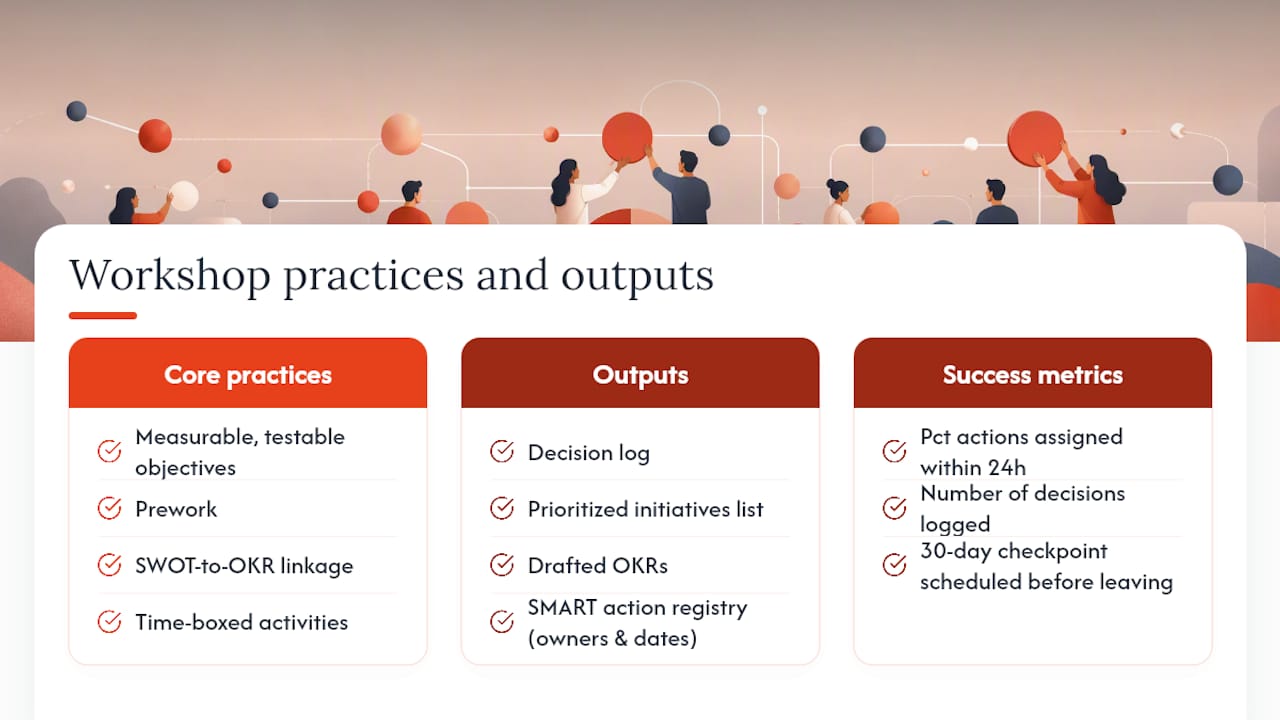
Choose two or three success metrics before the session. Useful ones: percentage of action items assigned within 24 hours, number of decisions formally logged, and whether the first 30-day checkpoint is scheduled before participants leave the room.
Who should you invite, and what role does each person play?
Participant count shapes everything. For a focused decision session, 6–10 people is the practical ceiling. Cross-functional planning sessions can scale to 15–20 with breakout groups, but every person above 10 adds coordination cost.
Core roles every workshop needs:
- Facilitator: Owns the process, not the content. Keeps time, manages energy, and intervenes when the group stalls or a single voice dominates.
- Decision owner: The person with authority to commit. Without this role named in advance, workshops produce recommendations that die in a follow-up email chain.
- Subject-matter experts (SMEs): Bring the data and domain knowledge. Limit to the minimum needed to cover the decision space.
- Scribe/recorder: Captures decisions, open questions, and action items in real time. This is not a junior task; the scribe shapes the official record.
- Timekeeper: Tracks blocks independently so the facilitator can stay focused on the group.
Before the workshop, each role holder should confirm:
- Facilitator has reviewed the objective and prepared activity instructions.
- Decision owner has pre-cleared any non-negotiable constraints.
- SMEs have prepared their data summaries (one page per topic, maximum).
- Scribe has the decision log template open and ready.
When the decision owner is a senior leader, psychological safety becomes a real design problem. One practical fix: run the first ideation block anonymously (sticky notes, silent writing) so ideas surface before hierarchy does.
Pro Tip: Send a one-page role card to each participant 48 hours before the session. It takes 10 minutes to write and eliminates the "what am I supposed to do here?" confusion that eats the first 20 minutes of most workshops.
What does a practical workshop agenda look like?
The Workshop Weaver planning guide defines the diamond flow as the reliable structural backbone: open, diverge, converge, and close. Every agenda template below follows that shape.
Half-day agenda (4 hours):
- 0:00–0:20 — Open: welcome, objective review, ground rules
- 0:20–0:50 — Context: SME data shares (10 min each, max 3)
- 0:50–1:20 — Diverge: silent idea generation, individual sticky notes
- 1:20–1:30 — Break
- 1:30–2:00 — Cluster: affinity mapping in pairs
- 2:00–2:30 — Converge: dot voting, priority matrix
- 2:30–2:45 — Decide: decision owner commits, scribe logs
- 2:45–3:00 — Close: action assignments, next session scheduled
Full-day agenda (8 hours): Follow Bob Stanke's one-day session structure, segmenting into morning (context + diverge), midday (cluster + lunch working session optional), and afternoon (converge + decide + close). Build in a 60-minute lunch break and two 15-minute breaks. Reserve the final 30 minutes exclusively for action assignment and follow-up scheduling.
Multi-session approach: The UNDP's example workshop agenda recommends a 3–5 day gap between sessions for complex strategy work. Session one handles context-setting and divergent exploration. The gap gives participants time to process outputs and return with sharper positions. Session two moves directly to convergence and commitment.
Pro Tip: Never schedule a multi-session workshop with less than three days between sessions. Two days feels like enough but rarely is. Participants need at least one full work day between the sessions to absorb what happened and prepare for the next round.
What prework and preparation should you send ahead?
Teams that prepare in advance make faster, higher-quality decisions during the session itself. Ritmoo's practitioner data shows that dedicated prework, including clear pre-reads and roughly 3–4 hours of aggregated preparation per participant, correlates with measurable improvements in decision efficiency.
Participant prework checklist:
- Read the one-page context brief (current state, constraints, decision scope).
- Complete any pre-assigned data summary or customer insight sheet.
- Draft two or three candidate priorities or options to bring to the session.
- Review the agenda and confirm your role responsibilities.
Logistics checklist:
- Room or virtual platform confirmed and tested 24 hours before
- Materials ready: sticky notes, markers, printed templates, or digital whiteboard set up
- Parking lot space designated (a visible area to capture off-topic items without losing them)
- Contingency plan for tech failure in virtual sessions (backup video link, phone dial-in)
- Cost estimate prepared for multi-day or offsite sessions (venue, travel, facilitation tools, catering)
Venue add-ons, last-minute material printing, and extended session time are the three most common budget surprises.*
Which facilitation methods work best for ideation and decisions?
The right method depends on where you are in the diamond flow. Here's a curated map:
Diverge phase methods:
- Silent idea generation (10–15 min): Each participant writes ideas independently before any discussion. Prevents anchoring on the first voice in the room.
- Reverse brainstorming (20 min): Ask "How would we guarantee this initiative fails?" then flip the answers. Surfaces risks and assumptions that positive framing misses.
- Futures Wheel (25 min): Map second and third-order consequences of a decision. Useful for initiatives with long time horizons.
Converge phase methods:
- Affinity clustering (20 min): Group similar ideas silently, then label clusters as a team.
- Priority matrix (25 min): Plot initiatives on a 2x2 grid of impact vs. effort. Forces explicit trade-offs.
- DACI for decisions: Assign Driver, Approver, Contributor, and Informed roles to each decision before the group commits. Eliminates the post-workshop "I thought you were handling that" problem.
Lead the Endurance's analysis makes a point most facilitation guides skip: a tidy agenda produces documents, not alignment. The methods you choose must create opportunities for honest behavior under pressure, not just structured output.
Handling common challenges:
- Dominant participant: Use silent writing rounds before open discussion. Redirect with "Let's hear from someone who hasn't spoken yet."
- Off-topic threads: Capture the item in the parking lot visibly, then return to the agenda. Never dismiss the point; just defer it.
- Decision stall: Name the stall explicitly. Ask the decision owner: "What information would change your position?" If none exists, the decision is ready.
For virtual or hybrid sessions, run affinity mapping in a shared digital whiteboard (Miro, FigJam, or MURAL work well). Use async polling tools like Mentimeter for dot voting so remote participants aren't disadvantaged by latency.
What deliverables should you capture and hand off?
Every workshop should produce at least three artifacts before participants leave:
The action registry must include: action description, owner name, due date, and success criterion. A RACI or DACI assignment for each initiative prevents the ownership ambiguity that stalls execution.
Handoff checklist:
- Scribe consolidates raw notes within 24 hours.
- Facilitator reviews and sends the clean decision log within 48 hours.
- Decision owner schedules the first 30-day check-in before the end of the session.
- All artifacts shared in a single location (Google Doc, Notion, or a project tracker).
For export, a CSV or structured doc that maps directly to your PM tool (Jira, Asana, GitHub) saves hours of re-entry. Versioning matters: label each document with a date and session number so the decision trail stays intact. The RFP Excel Template Toolkit from Swarm-stack covers export-ready artifact formats in detail.
Which tools support in-person, virtual, and hybrid workshops?
Tool selection comes down to four criteria: synchronous vs. asynchronous needs, export format compatibility with your PM stack, participant ease-of-use, and privacy/compliance requirements for sensitive planning data.
Tool categories to cover:
- Virtual whiteboards (Miro, FigJam, MURAL): best for diverge-phase activities and affinity mapping
- Shared documents (Google Docs, Notion): real-time note capture and decision log drafting
- Realtime polling (Mentimeter, Slido): anonymous voting and prioritization
- Action trackers (Jira, Asana, GitHub Projects, Linear): post-workshop execution and collaborative planning
- Recording/transcription (Otter.ai, Grain): async review and accountability
For small teams running a single focused session, a shared Google Doc plus a digital whiteboard covers most needs. Larger cross-functional groups or teams running recurring planning cycles benefit from a purpose-built platform that handles versioning, decision tracking, and export in one place.
How does Swarm-stack support the workshop blueprint?
Swarm-stack maps directly onto the workshop workflow: intake and objective-setting feed into versioned plan creation, live sessions combine human experts and AI specialists in real time, and outputs export directly to GitHub or Jira.
The platform's decision-tracking feature preserves the full argument trail, not just the final call. That matters when a 30-day review surfaces a stalled priority and the team needs to understand why the original decision was made.
A typical Swarm-stack session workflow:
- Team lead creates a session with the workshop objective and invites participants via a single link.
- AI specialists and human experts contribute structured input during the live session.
- Arguments are surfaced, refined, and logged with version history.
- The final deliverable exports to the team's PM tool immediately after the session.
This shortens the post-workshop consolidation window from the typical 48–72 hours of manual cleanup to near-immediate. The 30/60/90 follow-up cadence is easier to enforce when the decision log already exists in a structured, exportable format.
Pro Tip: Use Swarm-stack's versioning to enforce the 24–72 hour cleanup rule. Set the session to "draft" status immediately after the workshop, then move it to "final" only after the decision owner reviews and approves. That single gate prevents the common problem of a stale draft becoming the de facto record.
How do you measure whether the workshop actually worked?
Three metrics tell you quickly whether a workshop produced real output or just a good conversation:
- Percentage of action items with named owners within 24 hours
- Percentage of OKRs or KPIs with first evidence at the 30-day mark
- Whether the decision log is being used as the source of truth (not a forgotten attachment)
Follow-up cadence:
- 24–72 hours: Clean deliverables distributed, decision log finalized.
- 2-week check-in: 30-minute sync to surface blockers and confirm ownership.
- 30-day review: Are actions on track? Any priorities to reassign?
- 60/90-day reviews: Progress against OKRs, stakeholder reporting.
Multiple planning guides confirm that the 24–72 hour cleanup window and the 30/60/90 review cadence are the two practices most correlated with workshop outputs actually reaching execution.
For check-ins, three questions keep the conversation focused: What's on track? What's stalled and why? What needs a new owner or a revised timeline?
Pro Tip: Schedule the 30-day review before the workshop ends. A check-in that isn't on the calendar when people leave the room almost never gets scheduled afterward.
What most teams get wrong about planning workshops
The agenda is not the workshop. That's the insight Lead the Endurance makes that most facilitation guides bury: a well-structured run-of-show produces a document. Alignment requires something harder, building the team behaviors that let people defend a priority honestly and abandon a bad one without losing face.
The most common failure pattern is a workshop where the agenda runs perfectly and the decision log looks clean, but three weeks later nothing has moved. The cause is almost always the same: the group agreed on paper but never actually committed. The facilitator ran the process but didn't create the conditions for honest disagreement.
One fix that works immediately: build a "kill a priority" block into the converge phase. Ask the group to argue against their top-ranked initiative for five minutes before committing to it. The ideas that survive that pressure are the ones that will survive the first obstacle in execution.
Swarm-stack turns your workshop blueprint into a live, versioned session
Most teams leave a planning workshop with a shared doc that gets stale within a week. Swarm-stack gives your team a structured session where AI specialists and human experts contribute in real time, every argument is logged, and the final deliverable is versioned and export-ready the moment the session closes.
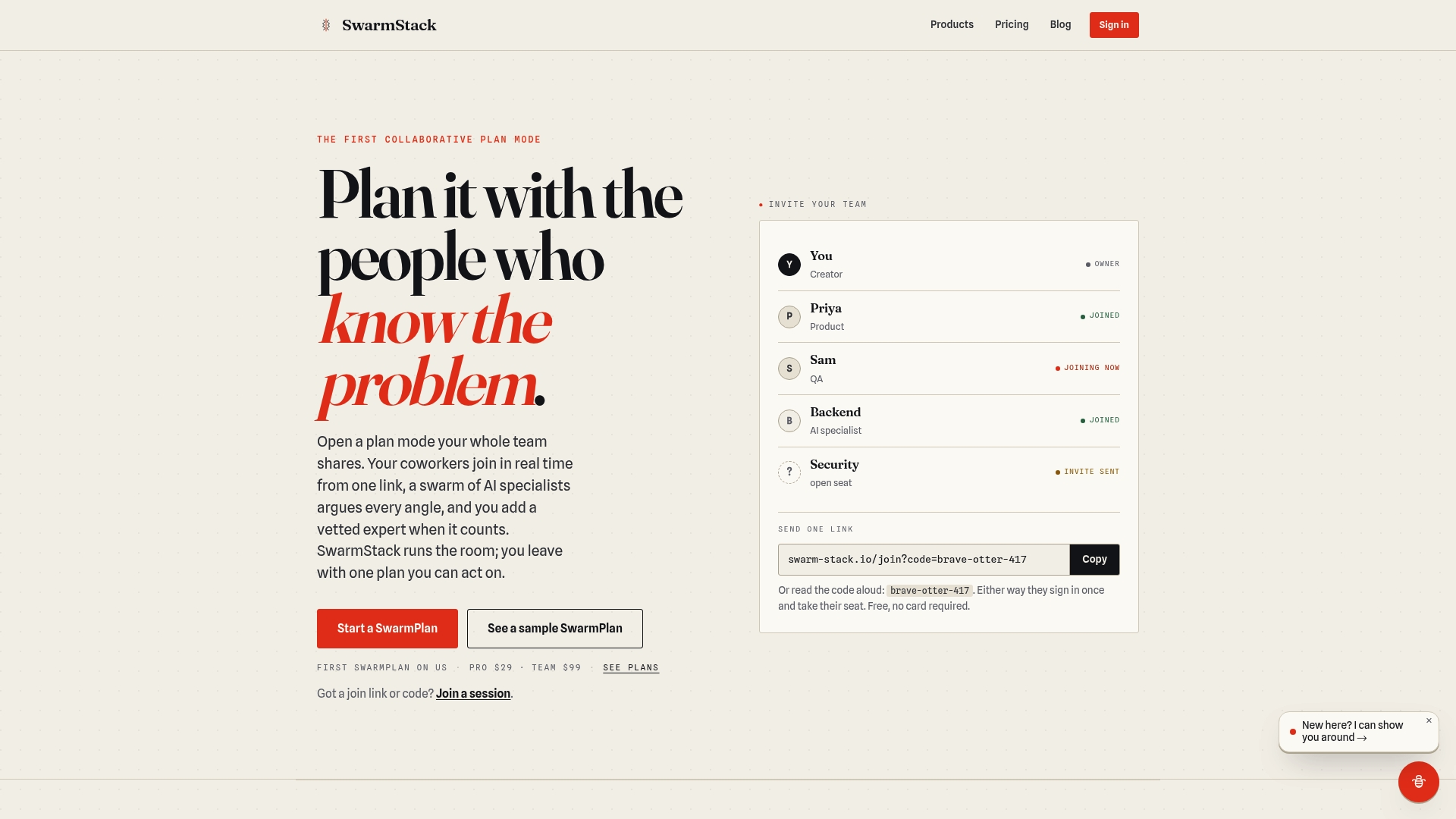
Two things Swarm-stack handles that manual workshops don't: automatic decision versioning so the "why" behind each call is never lost, and direct export to GitHub or Jira so action items reach your PM tool without a manual re-entry step. For procurement teams with data-handling requirements, the trust and privacy page covers compliance details directly.
Start a session on Swarm-stack and run your next planning workshop with a built-in decision trail.
Sources
These are the primary references behind the templates, timing guidance, and facilitation practices in this article:
- 10 Best Practices for Strategic Planning Workshops | Ritmoo
- Example Workshop Agenda | United Nations Development Programme
- Strategy Workshop Agenda Template (And Why the Agenda Isn't the Workshop) | Lead the Endurance
- How to Run a One-Day Strategic Planning Session That Actually Works — Bob Stanke | Executive Leadership Team Coach
For session templates, decision log formats, and expert support, Swarm-stack's resource library is a practical starting point.