WSJF Prioritization: A Practical Guide for Product Teams
Learn how WSJF prioritization helps product teams quickly rank their backlog for maximum economic return and efficient workflow.

WSJF prioritization sequences your backlog by economic return per unit of time: WSJF = Cost of Delay ÷ Job Size. The item with the highest score goes first. You can get a ranked list in 30 minutes or less.
Here's the quick-start:
- Score three Cost of Delay factors for each backlog item: User/Business Value, Time Criticality, and Risk Reduction/Opportunity Enablement. Use the modified Fibonacci scale (1, 2, 3, 5, 8, 13, 20).
- Sum those three scores to get Cost of Delay, then divide by Job Size (relative duration, not person-hours).
- Sort descending. The highest WSJF score goes first, adjusted for capacity and hard dependencies.
That's the whole method. Everything below makes it faster, more defensible, and repeatable across your team.
Key Takeaways
WSJF prioritization produces a defensible, economically grounded backlog sequence when teams score Cost of Delay components consistently, use duration as the denominator, and re-score at a regular cadence.
| Point | Details |
|---|---|
| Core formula | WSJF = (Business Value + Time Criticality + RR/OE) ÷ Job Size; sort descending. |
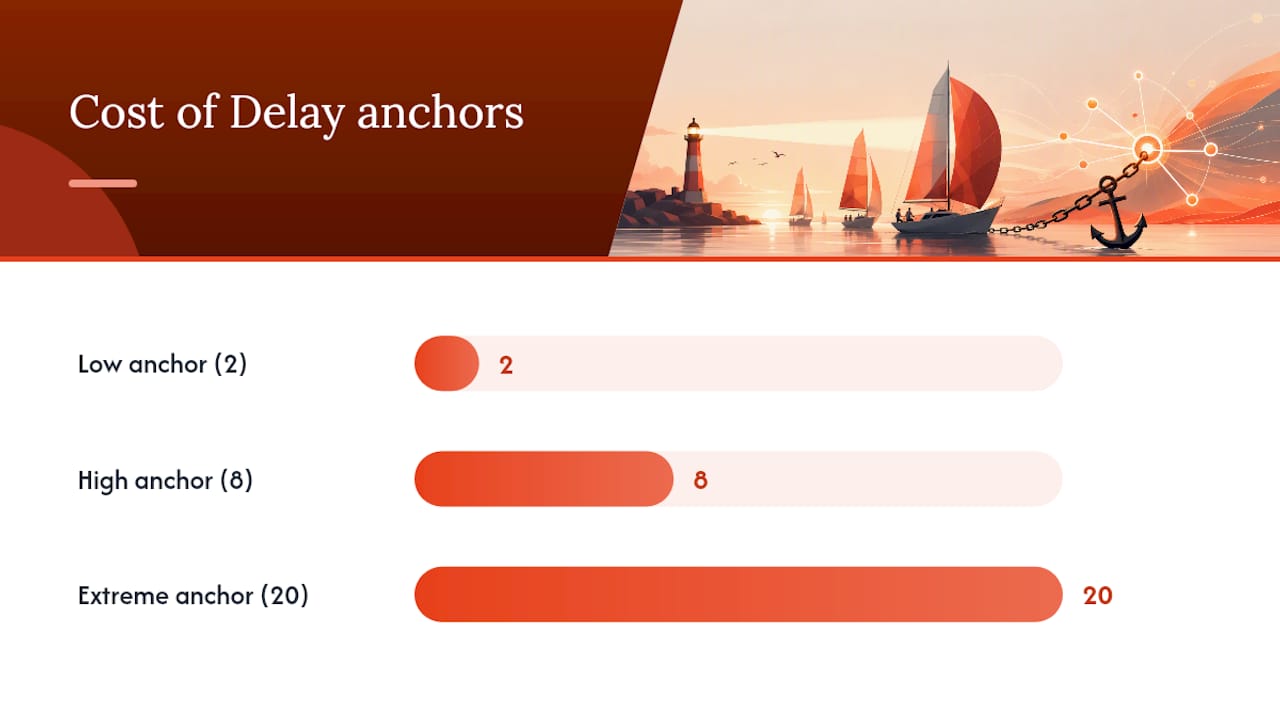
| Use the Fibonacci scale | Score each CoD component on 1, 2, 3, 5, 8, 13, 20 with reference anchors at 2, 8, and 20. |
| Duration, not effort | Job Size is calendar time (duration), not person-weeks; it determines when the next item starts. |
| Batch-score by component | Score all items on one component before moving to the next to reduce anchoring bias. |
| Swarm-stack for sessions | Swarm-stack structures live scoring sessions and exports results directly to Jira or CSV. |
Table of Contents
- What is WSJF and why does it matter for sequencing work?
- How do you calculate Cost of Delay and score each component?
- How should you estimate job size for the denominator?
- Step-by-step WSJF calculation with a worked example
- When does WSJF work well, and when should you use something else?
- How to run a WSJF prioritization session that actually sticks
- What tools work best for running WSJF in practice?
- What Lean and flow research tells us about using WSJF well
- The part most teams get wrong about WSJF
- How Swarm-stack helps teams run WSJF sessions with less friction
- Sources
What is WSJF and why does it matter for sequencing work?
WSJF stands for Weighted Shortest Job First, a prioritization model that sequences jobs for maximum economic benefit. It entered mainstream Agile practice through Don Reinertsen's Principles of Product Development Flow, where he formalized the CD3 idea: Cost of Delay Divided by Duration. The Scaled Agile Framework (SAFe) adopted and adapted it, replacing absolute dollar estimates with relative Fibonacci scoring to make it practical for cross-functional teams who rarely agree on precise monetary values.
In plain terms, WSJF answers a question that pure value rankings miss: how much value are you losing per unit of time by not doing this item now? A feature worth $1M that takes six months to build may be less urgent than a $200K fix that takes one sprint, because the fix stops bleeding value immediately. Duration is the lever. Delay a short, high-value item and the compounding loss is disproportionate.
SAFe uses WSJF at the portfolio, ART (Agile Release Train), and team backlog levels. At the portfolio level it sequences epics; at the ART level it sequences features; at the team level it can sequence stories, though the overhead rarely justifies it for very small items.
How do you calculate Cost of Delay and score each component?
Cost of Delay is the numerator of WSJF, and it has three components. Each is scored independently on the same relative scale, then summed.
The three components:
- User/Business Value: How much value does this item deliver to users or the business? A feature that delivers significant value to users or business scores high, whereas minor enhancements score low.
- Time Criticality: How does value decay over time? A regulatory deadline that imposes urgent timing scores high. A non-urgent, discretionary task scores low.
- Risk Reduction / Opportunity Enablement (RR/OE): Does this item reduce a significant technical or business risk, or unlock future work? Architectural groundwork that unblocks three downstream features scores high. A standalone cosmetic change scores low. For deeper context on how risk scoring fits into broader planning, the risk assessment playbook on Swarm-stack's blog is worth a read.
Scoring with the modified Fibonacci scale:
The recommended scale is 1, 2, 3, 5, 8, 13, 20. The gaps between higher numbers reflect genuine uncertainty at the top end. Relative scoring beats absolute dollar estimates for early-stage work because teams can agree "this is a 5 relative to that 3" far faster than they can agree on a revenue projection.
| Score | Meaning |
|---|---|
| 1 | Minimal value / urgency / risk impact |
| 2 | Low |
| 3 | Moderate |
| 5 | Significant |
| 8 | High |
| 13 | Very high |
| 20 | Extreme / existential |
Normalization guidance:
Before scoring, establish reference items for each column. Pick one item the group agrees is a "3" for Business Value, one that is an "8," and one that is a "20." These triangulation anchors prevent score creep, where every new item gradually drifts toward 13 or 20 as teams anchor to the most recent scores rather than the full range. SAFe recommends maintaining reference items anchored at 2, 8, and 20 to keep estimates comparable across sessions.
Pro Tip: Score all items on one component before moving to the next. Finish Business Value for every item, then move to Time Criticality, then RR/OE. Batch scoring reduces anchoring bias and keeps the comparison consistent within each dimension.
How should you estimate job size for the denominator?
The denominator in WSJF is job duration, not person-effort. That distinction matters. Duration determines throughput and when the next item can start. A feature that requires two engineers for four weeks occupies the queue for four weeks regardless of headcount. Use calendar time as your mental model.
Three practical sizing options:
- Relative story points: Familiar to most Agile teams, easy to reuse existing estimates. Map your team's typical velocity to rough calendar durations for context (e.g., 8 points ≈ one sprint for your team).
- T-shirt sizes: Faster to assign, lower precision. Useful when the backlog has many items and you need quick relative sizing. Map sizes to a numeric scale before computing WSJF.
- Relative days: Most direct for duration-based thinking. Assign a number representing how many "team-days" the item occupies the queue.
A simple mapping that works for most teams:
| T-shirt size | Story points | Relative days |
|---|---|---|
| XS | 1–2 | 1 |
| S | 3–5 | 2 |
| M | 8 | 3 |
| L | 13 | 5 |
| XL | 20+ | 8 |
If an item scores near the top of your WSJF ranking but has a very large size, break it down into smaller parts. Breaking a large feature into smaller deliverables almost always reveals that part of it is genuinely high-WSJF and part is not. Deliver the high-WSJF slice first.
Step-by-step WSJF calculation with a worked example
The full WSJF formula is:
WSJF = (Business Value + Time Criticality + RR/OE) ÷ Job Size
Follow these steps:
- List your backlog items in a spreadsheet. Each row is one feature or story.
- Score Business Value for all items before moving on. Use the Fibonacci scale and your reference anchors.
- Score Time Criticality for all items.
- Score RR/OE for all items.
- Sum the three scores to get Cost of Delay for each item.
- Assign Job Size using your chosen unit (story points, t-shirt numeric, or relative days).
- Compute WSJF by dividing Cost of Delay by Job Size.
- Sort descending. Review the top items against capacity and dependencies before finalizing sequence.
Worked example:
The regulatory update goes first despite not having the highest Business Value, because its Time Criticality is extreme and it's relatively short. The API fix is second. The new onboarding flow and the API fix share the same Cost of Delay (21), but the fix takes half the time, so it ranks higher. That's the economic logic WSJF makes visible.
Spreadsheet setup: Create columns for Feature, Business Value, Time Criticality, RR/OE, a SUM formula for Cost of Delay, Job Size, and a WSJF formula (=CoD/JobSize). Add a filter on the WSJF column and sort Z to A. For ties or near-equal scores (within 10% of each other), use a secondary sort by Time Criticality or escalate to a brief team discussion rather than treating the numeric difference as meaningful.
LogRocket's WSJF guide covers both qualitative and quantitative implementations if you want to see alternative spreadsheet layouts.
When does WSJF work well, and when should you use something else?
WSJF fits specific conditions. Applying it outside those conditions adds overhead without improving decisions.
Ideal contexts:
- Flow-based systems (Kanban, SAFe ART) where capacity is genuinely constrained and sequencing determines when value lands
- SAFe portfolio and ART backlog prioritization, where epics and features compete for PI capacity
- Regulatory or market deadlines that create hard time-criticality signals
- Backlogs with 10–50 items where scoring overhead is proportionate to the decision stakes
Where WSJF is less useful:
- Very small team backlogs (fewer than 8–10 items) where intuition and a quick conversation outperform a scoring session
- High-uncertainty bets where Business Value is genuinely unknowable (early discovery work, research spikes)
- When hard dependencies or capacity routing block the top-WSJF items anyway, making the sequence moot until constraints are resolved
WSJF is most effective where capacity is a material constraint and delay has measurable economic cost. When reach or confidence dominate the decision, frameworks like RICE or value-vs-effort grids are better fits. Atlassian's prioritization framework guide positions WSJF alongside RICE, Kano, and value/effort models and is worth consulting when choosing between them.
Anti-patterns to avoid:
- Using WSJF as the sole decision rule, ignoring capacity routing and WIP limits
- Gaming scores by inflating Time Criticality to push a pet feature up the list
- Running WSJF once and never re-scoring, letting the ranking go stale as market conditions shift
- Scoring at the story level, where the overhead is rarely worth it
Quick decision check: Use WSJF if you have constrained capacity, a backlog with meaningful size variation, and at least some items with clear time-sensitivity. Skip it if your backlog is tiny, your items are all roughly the same size, or you're in pure discovery mode.
How to run a WSJF prioritization session that actually sticks
The scoring session is as valuable as the numeric output. Cross-functional scoring builds alignment and forces decomposition of items that are too vague to score. Here's a repeatable playbook.
Roles to involve:
- Product Management: owns Business Value scores and final ranking decisions
- Business Owners: bring market and revenue context, especially for Time Criticality
- Architects / Tech Leads: score RR/OE and flag technical dependencies
- Release Train Engineer (RTE): facilitates, keeps the session timeboxed
- Engineering representatives: provide Job Size estimates and flag capacity constraints
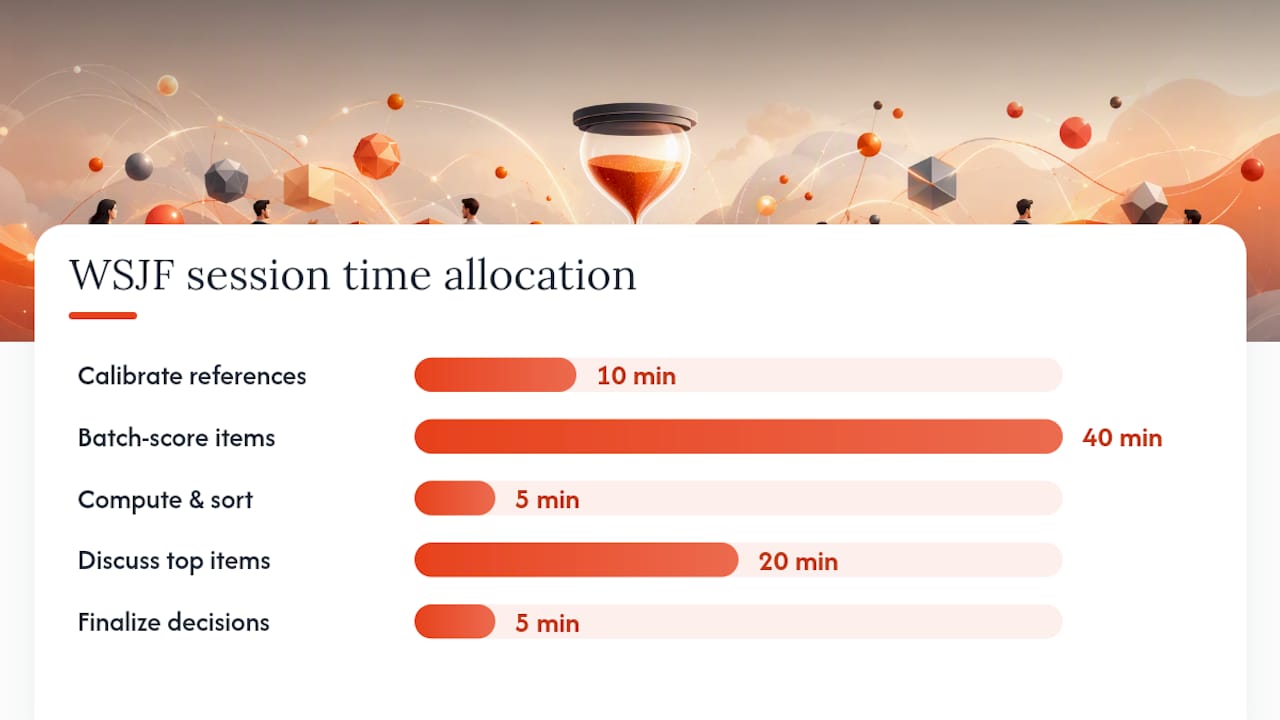
Timeboxed session agenda (90 minutes total):
- Prework (async, before the session): Distribute the backlog list and reference anchors. Ask participants to do a first-pass score individually. 15 minutes.
- Calibrate reference items (10 min): Confirm the group agrees on the 2, 8, and 20 anchors for each component. This is the most important 10 minutes of the session.
- Batch-score by component (40 min): Business Value for all items (12 min), Time Criticality (12 min), RR/OE (12 min), Job Size (4 min). Use planning poker or silent dot-voting for each item, then discuss outliers only.
- Compute and sort (5 min): Enter scores into the spreadsheet, compute WSJF, sort descending.
- Discuss and triage (20 min): Review the top 5–7 items. Flag dependencies, capacity constraints, and any items that need splitting. Adjust sequence where hard constraints apply.
- Finalize and document (5 min): Confirm the sequence, note decisions and rationale.
Consensus techniques:
- Planning poker: Each participant holds up a card simultaneously. Discuss only when the spread is wide (e.g., one person scores 3, another scores 13). This prevents anchoring to the first voice in the room.
- Reference triangulation: When a score feels off, ask "Is this more or less urgent than Feature X, which we scored 8?" Relative comparisons resolve most disagreements faster than abstract debate.
- Handling political pressure: When a stakeholder pushes hard for a high Time Criticality score without a concrete deadline or market signal, ask them to name the specific event that creates the urgency. "We should do this soon" is not Time Criticality. "Our SOC 2 audit is in 60 days" is.
Pro Tip: Set a scoring guardrail at the start: no item may score 20 on more than one component unless the group can name a specific, external forcing function. This single rule cuts score inflation by half in most sessions.
Reprioritize at least once per PI (Program Increment) in SAFe contexts, or every four to six weeks in Kanban systems. More frequent re-scoring is warranted when market conditions shift significantly or when a major item completes and new capacity opens.
What tools work best for running WSJF in practice?
You don't need specialized software. A spreadsheet handles WSJF well for most teams, and Jira can carry it forward into execution.
Spreadsheet template (minimum viable setup):
- Columns: Feature Name | Business Value | Time Criticality | RR/OE | Cost of Delay (=B+C+D) | Job Size | WSJF (=CoD/JobSize) | Rank | Notes
- Add a data-validation dropdown on Business Value, Time Criticality, RR/OE, and Job Size columns, restricted to 1, 2, 3, 5, 8, 13, 20
- Use
=RANK(G2, $G$2:$G$20, 0)in the Rank column for automatic ordering - Export to CSV after each session and version the file by date (e.g.,
wsjf_backlog_2026-03-15.csv)
Quick Jira setup:
- Add four custom number fields:
CoD_BusinessValue,CoD_TimeCriticality,CoD_RROE, andJobSize - Create a fifth field
WSJF_Scoreand populate it manually after each session, or use a Jira automation rule to compute it when the component fields are updated - Build a board filter sorted by
WSJF_Scoredescending to give the team a live view of the current sequence - Watch for stale scores: Jira does not prompt re-scoring automatically, so add a label or flag for items that haven't been re-scored in more than one PI
Tooling considerations:
- Keep scoring manual (in a live session) rather than automating it. The alignment value of the conversation outweighs the time saved by auto-scoring. Automation is appropriate for computing WSJF from already-agreed scores, not for generating the scores themselves.
- For teams using collaborative planning tools beyond Jira, the same CSV export pattern applies: score in a shared session, export, import into your board.
What Lean and flow research tells us about using WSJF well
Don Reinertsen's CD3 framework is the intellectual foundation here. His central insight: sorting by value alone produces the wrong sequence because it ignores how long each item occupies the queue. Dividing by duration transforms a value ranking into an economically correct throughput sequence. SAFe's WSJF documentation traces this lineage explicitly and explains why relative estimates replace Reinertsen's original absolute-dollar approach in practice.
The practical implication of using calendar time as the denominator is significant. A team that uses person-weeks instead of duration will systematically underprioritize short, high-value items that happen to require a large team. Duration is the right unit because it determines when the next item can start, which is what sequencing actually controls.
SAFe's guidance on WSJF emphasizes keeping scoring fast and repeatable over making it precise. Relative estimates that the team can produce in 90 minutes and revisit every PI are more valuable than a theoretically exact model that takes days to build and never gets updated. The goal is a defensible sequence, not a perfect one.
SAFe recommends using reference items and batch scoring to reduce anchoring and score creep, and cautions that WSJF should inform sequence decisions without being the sole override. Capacity routing, skill availability, and strategic alignment all belong in the conversation.
One actionable cadence rule: re-score your full backlog at the start of each PI or major planning cycle. For Kanban teams without fixed PIs, a monthly re-scoring session keeps the ranking current without creating excessive overhead. Items that have been waiting more than two cycles without being pulled should trigger a conversation about whether they belong in the backlog at all.
WSJF also ignores sunk costs by design. The denominator is remaining job size, not total investment to date. That discipline prevents past spending from distorting future sequencing, which is one of the most common failure modes in roadmap planning.
The part most teams get wrong about WSJF
WSJF is a decision discipline, not an oracle. The number it produces is only as good as the conversation that produced it, and that's actually the point.
The teams that get the most out of WSJF aren't the ones with the most precise scores. They're the ones who use the scoring session to surface disagreements that would otherwise stay hidden until a sprint review. When a product manager scores Time Criticality at 13 and an engineer scores it at 2, that gap isn't a problem to resolve with averaging. It's a signal that someone has information the other person doesn't. The session exists to surface that.
The facilitation move that changes everything: when you hit a wide spread on any score, don't ask "what's the right number?" Ask "what would have to be true for this to be a 13?" That reframe shifts the conversation from opinion to evidence, and it usually resolves in two minutes.
Political pressure is the harder problem. Stakeholders sometimes push for high scores on items they're personally invested in, and the facilitator's job is to redirect that energy toward evidence. The guardrail mentioned earlier (no 20 without a named external forcing function) handles most of this. For the rest, the discipline of batch scoring helps: when everyone scores all items on one component before moving to the next, it's harder to inflate a single item in isolation.
How Swarm-stack helps teams run WSJF sessions with less friction
Running a WSJF session across a distributed team is where the process usually breaks down. Scores get entered in different spreadsheets, rationale disappears after the call, and the Jira board never reflects what the team actually decided.
Swarm-stack structures the session itself. Teams run a live scoring session where AI specialists and human experts contribute to each component score simultaneously, with every argument and score captured in a versioned deliverable. Three features make a direct difference for WSJF work:
- Structured scoring sessions: Each CoD component gets its own session thread, so Business Value, Time Criticality, and RR/OE scores are captured with their rationale, not just their numbers.
- Versioned decision tracking: Every session produces a timestamped deliverable. When you re-score at the next PI, you can compare the new ranking against the previous one and see exactly what changed and why.
- Export to Jira and CSV: After the session, scores export directly to Jira custom fields or a CSV, cutting the admin step that usually loses half the context.
For teams that want to run their first WSJF session without building a spreadsheet from scratch, Swarm-stack's platform includes a structured session template ready to use. Start a session, invite your team via a single link, and have a ranked backlog with documented rationale by the end of the meeting.
Sources
The sources below shaped this article and are worth bookmarking for deeper study:
- Challenge of Economic Prioritization - SAFe Agile
- Weighted Shortest Job First (WSJF) — Scaled Agile Framework
- WSJF (Weighted Shortest Job First): How to Evaluate and Prioritize Effectively
- Six product prioritization frameworks and how to pick the right one - Atlassian