User Stories vs Use Cases: A Practical Guide for Product Teams
Discover when to use user stories for quick wins and use cases for detailed specifications. Enhance your product team’s efficiency today!

Use user stories for small, outcome-driven increments your team can build in a sprint. Use use cases when you need a system-level, step-by-step specification that captures every actor, every alternate flow, and every error condition. That's the core of the user stories vs use cases debate, and most teams get it wrong by treating the two as interchangeable.
Rule of thumb: If a developer can build it in one to two weeks and the "why" matters more than the "how," write a story. If you need to document what the system does across multiple actors and failure modes, write a use case.
The rule flips in three situations:
- Regulatory or audit work. Healthcare, finance, and embedded systems often require documented flows with explicit error handling. A user story alone won't satisfy a compliance reviewer.
- Complex multi-actor flows. When three or more actors interact with the same feature (say, a patient, a nurse, and a billing system), a use case captures the handoffs that a story glosses over.
- Remote or offshore development. Written use-case flows reduce blocked work because they capture alternate paths and error conditions the team would otherwise need to clarify asynchronously.
Quick decision checklist:
- Does this feature involve more than two actors or system types? → Use case.
- Can one developer build and test this in a single sprint? → User story.
- Does a regulator, auditor, or legacy migration require documented behavior? → Use case (or both).
Key Takeaways
User stories drive sprint delivery; use cases document the system-level flows, alternate paths, and error conditions that stories alone can't fully specify.
| Point | Details |
|---|---|
| Stories vs use cases | Use stories for single-actor, sprint-sized increments; use cases for multi-actor or compliance-heavy features. |
| Three C's matter | Card, Conversation, and Confirmation: acceptance criteria are what make a story testable and complete. |
| Hybrid is often best | Combine use cases for discovery and stories for delivery on any feature with three or more alternate flows. |
| Traceability is the glue | Link every use case to its Jira epic and every story's acceptance criteria to a test case or BDD scenario. |
| Swarm-stack for decisions | Swarm-stack structured sessions produce versioned artifact decisions exportable directly to Jira and Confluence. |
Table of Contents
- What are user stories, and how do the Three C's work?
- What is a use case, and when should you write one?
- How do user stories and use cases compare across key dimensions?
- The same feature written as a user story and as a use case
- Ready-to-copy templates for user stories and use cases
- How do you decide whether to write a story or a use case?
- How to integrate both artifacts into an Agile workflow
- Common mistakes teams make when substituting one artifact for the other
- Which tools help you manage stories and use cases effectively?
- A structured session for deciding which artifact to write
- The case for keeping both artifacts in your toolkit
- Swarm-stack makes artifact decisions faster and more traceable
- Sources
What are user stories, and how do the Three C's work?
A user story is a short, plain-language description of a feature told from the perspective of the person who wants it. The canonical format is: "As a [user], I want [action] so that [benefit]." That sentence is deliberately small. It is not a specification. It is, as Scrum, a "placeholder for conversation" rather than a full formal requirement.
The Three C's, coined by Ron Jeffries, explain why that matters:
Card. The story fits on an index card. Its purpose is to capture just enough to start a conversation, not to document every detail. Keeping it short forces prioritization.
Conversation. The real requirement lives in the discussion between the product owner, developer, and tester. The card triggers that conversation; it doesn't replace it. This is where edge cases, constraints, and design decisions surface.
Confirmation. Acceptance criteria are the written output of the conversation. They confirm what "done" means and make the story testable. Without them, a story is just a wish.
How acceptance criteria connect to tests
Acceptance criteria come in two common forms. The first is a plain rules list: "The user can filter results by date range. The filter defaults to the last 30 days. An empty result set shows a 'No results found' message." The second is Gherkin syntax, which maps directly to automated tests:
- Given the user is on the search results page
- When they apply a date filter for the last 7 days
- Then only results from the last 7 days appear
Gherkin is worth the extra effort when your team uses Cucumber, SpecFlow, or a similar behavior-driven development (BDD) framework, because the scenario becomes an executable test. For teams without BDD tooling, a plain rules list works fine.
Sizing and anti-patterns
A properly sized story is buildable in one to two weeks by one developer. If a story takes longer, it's an epic and needs splitting. The most common anti-pattern is framing a technical task as a user story: "As a developer, I want to refactor the authentication module so that the codebase is cleaner." That's not a user story. It's an enabler task. Forcing it into story grammar obscures its purpose and pollutes the backlog with items that have no direct user value. Use a separate "enabler" or "technical task" issue type instead.
Pro Tip: Write acceptance criteria before you estimate. If you can't write three concrete criteria, the story isn't ready to be pointed.
What is a use case, and when should you write one?
A use case describes how an actor (a person, system, or device) interacts with a system to achieve a goal. Ivar Jacobson introduced the concept as part of object-oriented software engineering in the late 1980s, and it became a cornerstone of UML-based systems analysis. Where a user story asks "what outcome does the user want?", a use case asks "what does the system do, step by step, to deliver that outcome?"
A well-formed use case has five sections:
| Section | What it captures |
|---|---|
| Actor | Who or what initiates or participates in the interaction |
| Preconditions | What must be true before the use case begins |
| Main success scenario | The step-by-step happy path |
| Extensions / alternate flows | What happens when something goes wrong or a branch occurs |
| Postconditions | What is true after the use case completes successfully |
The extensions section is where use cases earn their keep. A user story might say "the user can reset their password." A use case documents what happens when the reset link has expired, when the email address isn't found, when the user has exceeded the retry limit, and when the new password fails the complexity rule. Each of those branches is a test case waiting to be written.
When to diagram and when text is enough
A use-case diagram (UML stick figures and ovals) is useful for two purposes: showing the boundary of a system at a glance, and communicating actor relationships to non-technical stakeholders. For a feature with two actors and a straightforward flow, a text-based use case is faster and easier to maintain. Reach for Visual Paradigm or a similar UML tool when you have four or more actors, when the system boundary itself is under discussion, or when you need an exportable diagram for a regulatory submission.
Use cases are valuable when you need main and alternative flows, extensive error-handling, or documentary evidence for audits or legacy migration projects. For those scenarios, a user story alone leaves too many gaps.
Pro Tip: Keep your use-case text in Confluence and embed the Visual Paradigm diagram as a linked image. That way the narrative and the visual stay in sync without duplicating content.
Requirements documents provide a comprehensive view that includes both functional and nonfunctional needs. Use cases sit closer to that end of the spectrum than stories do, which is why they're the natural choice when a project needs formal traceability.
How do user stories and use cases compare across key dimensions?
Stories and use cases serve different purposes and are complementary. Treating them as interchangeable is the most common misconception practitioners carry into backlog grooming. Here's how they actually differ:
| Dimension | User story | Use case |
|---|---|---|
| Primary question answered | What outcome does the user want? | What does the system do to achieve a goal? |
| Level of detail | Low to medium; intentionally brief | Medium to high; exhaustive flows |
| Typical format | "As a / I want / so that" + acceptance criteria | Actor, preconditions, main flow, extensions, postconditions |
| Who writes/owns it | Product owner or product manager | Business analyst or systems architect |
| Lifecycle timing | Sprint planning, backlog refinement | Discovery, architecture, regulatory review |
| Artifacts produced | Acceptance criteria, BDD scenarios | Flow diagrams, test cases, traceability matrix |
| Best for | Incremental delivery, Agile sprints | Complex flows, multi-actor systems, compliance |
| Testing/QA mapping | Acceptance criteria → unit and integration tests | Alternate flows → edge-case and regression tests |
| Traceability | Links to epic, sprint, and release | Links to requirements, test plans, and audit logs |
A hybrid approach is often the strongest choice. Use stories to drive sprint delivery and use cases to document the complex flows that stories can't fully specify. A hybrid approach is practical: stories for Agile backlog planning, use cases for complex workflows or regulatory documentation where detailed flows and exceptions are required.
When the feature is simple and the team is co-located, stories alone are usually enough. When the feature touches multiple systems, requires audit trails, or involves actors who aren't users (like a payment gateway or a compliance engine), add a use case.
The same feature written as a user story and as a use case
Feature: Password reset for a web application.
User story version
"As a registered user, I want to reset my password via email so that I can regain access to my account if I forget my credentials."
Acceptance criteria:
- Given the user is on the login page, when they click "Forgot password," then a reset email is sent to the registered address within 60 seconds.
- Given the user clicks the reset link, when the link is less than 24 hours old, then they are taken to the password reset form.
- Given the user submits a new password, when it meets the complexity rules (8+ characters, one uppercase, one number), then the password is updated and the user is redirected to the login page.
- Given the user clicks a reset link older than 24 hours, then they see an "expired link" message with an option to request a new one.
Use case version
Actor: Registered user, email delivery service
Preconditions: The user has a verified email address on file. The email service is operational.
Main success scenario:
- User navigates to the login page and selects "Forgot password."
- System prompts for the registered email address.
- User submits the email address.
- System validates the address and sends a reset link with a 24-hour expiry.
- User opens the email and clicks the reset link.
- System validates the link and presents the password reset form.
- User enters and confirms a new password meeting complexity rules.
- System updates the password, invalidates all active sessions, and redirects the user to the login page.
Extensions (alternate flows):
- 3a. Email address not found → System displays "If that address is registered, you'll receive an email" (security-neutral message).
- 5a. Link expired → System displays an expiry notice and offers to resend.
- 7a. Password fails complexity rules → System highlights the failed rule inline; user corrects and resubmits.
- 7b. User exceeds five failed attempts → System locks the reset flow for 30 minutes.
Postconditions: The user's password is updated. All prior sessions are invalidated. An audit log entry is created.
Where the two formats align and where they diverge
The story's acceptance criteria and the use case's main flow cover the same happy path. But the use case surfaces four edge cases (unknown email, expired link, complexity failure, lockout) that the story's acceptance criteria only partially address. A team that ships from the story alone will likely miss the lockout logic and the session invalidation requirement.
The real cost of choosing the wrong format isn't a messy backlog. It's a QA cycle that discovers the lockout edge case two days before release, when fixing it is expensive. The use case would have caught it in discovery.
This is the practical consequence academic research and practitioner guidance point to: use stories for scoped backlog items and reserve use cases to elaborate stories that require formal flows, test cases, or traceability.
Ready-to-copy templates for user stories and use cases
User story template
As a [type of user],
I want [to perform some action]
so that [I can achieve some goal/benefit].

Acceptance Criteria:
- Given [context], when [action], then [outcome].
- Given [context], when [action], then [outcome].
- Boundary: [edge case or limit to test].
Three acceptance criteria patterns to choose from:
- Rules list. Plain English statements of what the system must do. Best for simple, non-branching behavior.
- Gherkin scenario. Given/When/Then syntax. Best when you have BDD tooling or want criteria to double as automated tests.
- Boundary tests. Explicit statements of limits (max file size, session timeout, retry cap). Best for security, performance, and data validation features.
Full use case template
Use Case ID: UC-[number]
Use Case Name: [verb phrase, e.g., "Reset Password"]
Actor(s): [primary actor], [secondary actor if any]
Preconditions: [what must be true before this begins]

Main Success Scenario:
1. [Actor does X]
2. [System responds with Y]
3. [Continue step by step to goal]

Extensions:
[step number]a. [Condition] → [System response]
[step number]b. [Condition] → [System response]

Postconditions: [what is true after success]
Traceability: [linked epic, story IDs, requirement IDs]
Mapping a use case to the backlog
Once you have a use case, break it into stories by treating each actor goal as a candidate story and each extension as a candidate acceptance criterion or separate story. The main success scenario usually maps to one or two stories. Extensions that are complex or involve a separate actor often become their own stories or enabler tasks.
Checklist: is this artifact ready for implementation?
- Does every acceptance criterion have a testable outcome?
- Are all actors named and their permissions defined?
- Are the top three error conditions covered (not all of them, just the most likely)?
- Is the story or use case linked to its parent epic?
- Has a developer read it and confirmed they could build it without a follow-up meeting?
Pro Tip: Paste the use case template into a Confluence page template so every new use case your team writes starts with the same structure. Consistency cuts review time in half.
How do you decide whether to write a story or a use case?
Work through these questions in order during backlog grooming:
- How many actors are involved? One actor, one system → story is probably enough. Two or more actors with distinct roles → consider a use case.
- How many alternate flows exist? Fewer than three branches → story with acceptance criteria. Three or more branches, especially with error states → use case.
- Is there a regulatory or audit requirement? Yes → use case, or both. No → story is fine.
- Is the team distributed or asynchronous? Yes → use case reduces clarification overhead. No → story with a good conversation works.
- How tightly is this feature coupled to other systems? Loosely coupled → story. Tightly coupled with defined API contracts or external dependencies → use case.
Red flags that push you toward a use case
- The feature description contains the words "unless," "except when," or "if the user has not."
- A developer has asked the same clarifying question twice in two different sprints.
- QA keeps finding edge cases in regression that weren't in the acceptance criteria.
- The feature is part of a compliance audit or a legacy migration.
Red flags that push you toward a story
- The use case document is longer than two pages for a single feature.
- No one on the team has read the use case before sprint planning.
- The use case describes implementation details (database calls, API endpoints) rather than system behavior.
Quick decision checklist for backlog grooming
- Single actor, single goal, buildable in one sprint → story.
- Multiple actors or flows, or compliance requirement → use case (or both).
- Technical infrastructure work with no direct user value → enabler task, not a story.
How to integrate both artifacts into an Agile workflow
The most effective teams don't choose between stories and use cases. They sequence them. Use cases come first for complex features during discovery; stories drive delivery during sprints. Here's how that works in practice.
Use-case-first pattern (complex features):
- Write the use case during discovery or an architecture spike.
- Break the main success scenario into one or two stories.
- Convert each extension into an acceptance criterion or a separate story.
- Link the use case document (in Confluence) to the epic in Jira.
Story-first pattern (incremental discovery):
- Write a thin story to get something buildable into a sprint.
- After the first sprint, if the feature grows in complexity, write a use case to document the emerging flows.
- Attach the use case to the original story as a linked document.
Jira and Confluence workflow
Structure Jira issues as follows: Epic → Story → Sub-task. Link each story to its use case page in Confluence using the "Confluence page" link type. This keeps the narrative in Confluence (where it's readable) and the work tracking in Jira (where it's actionable).
For traceability, add a custom field to your Jira story issue type called "Use Case ID." Populate it with the UC number from the Confluence page. When a QA engineer writes a test case, they reference the same UC number, creating a three-way link: story → use case → test case.
| Artifact | Where it lives | Linked to |
|---|---|---|
| Use case | Confluence page | Jira epic, test plan |
| User story | Jira issue | Confluence use case, sprint |
| Acceptance criteria | Jira story description | BDD test suite or test case |
| Diagram | Visual Paradigm / Miro | Embedded in Confluence page |
Pro Tip: When you export a Jira epic to GitHub Issues or a CI pipeline, include the Confluence use case URL in the epic description. Developers working in GitHub can pull up the full flow without switching tools.
For distributed teams, written use-case flows reduce blocked work by capturing alternate paths and error conditions upfront, a practice consistent with lean documentation principles for asynchronous collaboration.
Common mistakes teams make when substituting one artifact for the other
The most expensive mistake is treating a user story as a complete specification. A story is a conversation starter. When a team ships from the story card alone, without acceptance criteria and without a use case for complex flows, they're building from an incomplete picture. The result is rework: a developer builds the happy path, QA finds the edge cases, and the team spends the next sprint fixing what discovery should have caught.
Common mistakes and their remedies:
- Treating a story as a full spec. Remedy: attach a lightweight use-case flow or at least three acceptance criteria covering the main path and two error conditions before the story enters a sprint.
- Writing use cases for trivial features. A single-actor, no-branch feature doesn't need a use case. Writing one wastes time and creates documentation no one reads. Remedy: apply the decision checklist above before starting a use case.
- Forcing technical tasks into user story format. "As a developer, I want to upgrade the database schema..." is not a user story. Remedy: use an enabler story or a technical task issue type. Academic research confirms this is a non-obvious pitfall that reduces backlog clarity.
- Skipping alternate flows entirely. Teams in a hurry write the happy path and ship. Alternate flows surface in production. Remedy: require at least one extension in every use case before it's considered complete.
- Orphaned use cases. A use case written during discovery that never gets linked to a story or epic becomes invisible. Developers don't find it; QA doesn't reference it. Remedy: make the Confluence-to-Jira link a definition-of-ready requirement.
Symptoms to watch for: incomplete test coverage on edge cases, repeated rework in the same feature area, stakeholder confusion about what the system actually does in error states.
Pro Tip: During sprint retrospectives, ask one question: "Did we discover any behavior in QA that should have been in a use case?" If the answer is yes more than twice in a row, your team needs a use-case habit for that feature type.
Which tools help you manage stories and use cases effectively?
Jira
Jira is the default backlog tool for most Agile teams. Structure your issue hierarchy as Epic → Story → Sub-task. Use the "Link" feature to connect stories to Confluence use-case pages. For traceability, add a custom field (Use Case ID) to the story issue type. Jira's built-in export to GitHub and CI tools means your stories and their linked use cases travel with the work.
For teams using Jira's Advanced Roadmaps, map epics to use cases at the planning level. Each epic can represent a major use case; the stories beneath it represent the main flow and extensions broken into deliverable increments.
Confluence
Confluence is where use cases live. Create a space template for use cases using the structure from the template section above. Use Confluence's "Page Properties" macro to create a use-case register: a single page that lists all use cases, their IDs, statuses, and linked Jira epics. This gives product managers and business analysts a single source of truth without leaving Confluence.
Embed Visual Paradigm diagrams directly in Confluence pages using the Visual Paradigm plugin. The diagram stays linked to the source file, so updates in Visual Paradigm reflect in Confluence automatically.
Miro
Miro works best in the discovery phase, before you've decided whether to write a story or a use case. Use a Miro board to sketch actor flows collaboratively with stakeholders. Sticky notes map to actors and steps; arrows map to flows and branches. Once the flow is clear, export the board as a reference and write the formal use case or story from it.
Miro's "Frames" feature lets you organize a whiteboard session into sections: one frame for the happy path, one for alternate flows, one for open questions. At the end of the session, the open-questions frame becomes your list of acceptance criteria gaps.
Visual Paradigm
Visual Paradigm is the tool of choice for formal UML use-case diagrams. It supports actor-system boundary diagrams, include/extend relationships, and exportable flow documents. For regulated industries, Visual Paradigm's export to PDF or Word creates the audit-ready documentation a Confluence page alone can't produce.
Use Visual Paradigm for diagrams and Confluence for the narrative. Keep them linked. Don't try to maintain both in the same tool.
A structured session for deciding which artifact to write
Running a short, structured session before writing any artifact saves more time than it costs. Here's a repeatable agenda:
- Invite the right people (5 minutes prep). Product owner, one developer, one QA engineer, and one business analyst. For regulated features, add a compliance or legal stakeholder. Four to five people is the right size; more than six slows the decision.
- Preparation (before the session). Share the feature description and any existing requirements or wireframes. Ask each attendee to note one assumption they're making about the feature.
- Discovery (10 minutes). State the feature goal in one sentence. Each attendee shares their assumption. The facilitator captures them on a shared board (Miro works well here).
- Sketch flows (15 minutes). Map the main success path as a numbered list. Then ask: "What could go wrong at each step?" Each branch is a candidate extension. Count the branches.
- Decide the artifact (5 minutes). Apply the decision checklist: number of actors, number of branches, regulatory need, team distribution. The group agrees on story, use case, or both.
- Capture outputs (5 minutes). The facilitator writes the decision in a Confluence page: chosen artifact, rationale, open questions, and who signs off. Link the page to the Jira epic.
Concrete outputs from the session:
- A decision artifact (Confluence page) documenting the chosen format and the rationale.
- A draft story or use case skeleton ready for the product owner to complete.
- A list of open questions assigned to named owners with a due date.
- A Jira epic link connecting the decision to the backlog.
Session duration: 35 minutes for a standard feature. Add 15 minutes for regulated or multi-system features.
Sign-off: The product owner signs off on the chosen artifact type. The business analyst owns the use case if one is written; the product owner owns the story.
Pro Tip: Use a Swarm-stack session to run the discovery and flow-sketching steps. The platform's structured interview format surfaces assumptions from multiple participants simultaneously, which cuts the discovery phase from 15 minutes to under 10 and produces a versioned output you can export directly to Confluence or Jira.

For features involving risk or compliance, a structured risk assessment session run before the artifact decision helps surface the regulatory requirements that push a feature toward a use case.
The case for keeping both artifacts in your toolkit
Most of the debate around user stories vs use cases is a false choice. The teams that struggle are the ones who pick a side and stick to it regardless of context. The teams that ship clean, well-tested features are the ones who ask "what does this feature actually need?" before they open a Jira ticket.
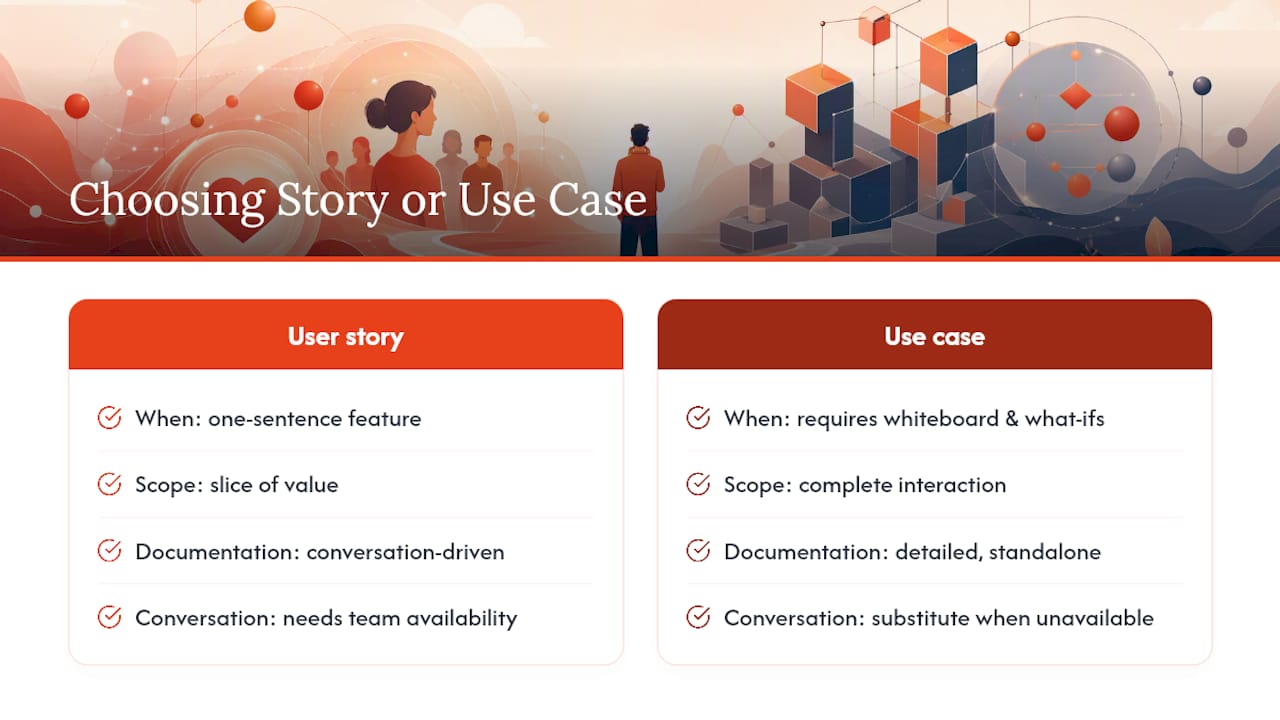
Here's the heuristic worth keeping: if you can explain the feature in one sentence and a developer can build it in a week, write a story. If explaining the feature requires a whiteboard and three "but what if" questions, write a use case first and break it into stories afterward.
The Three C's are a useful reminder that a story is a social artifact, not a document. The conversation is the requirement. But that only works when the team is available, aligned, and communicating in real time. When those conditions don't hold, a use case is the written substitute for the conversation you can't have.
Alistair Cockburn and Martin Fowler made this point clearly: the two artifacts operate at different abstraction levels. A use case describes a complete interaction; a story describes a slice of value. You need both levels to build software that works end to end and ships incrementally.
The teams I've seen get this right share one habit: they decide the artifact type before they write anything. That decision, made explicitly and documented, saves more rework than any template or tool.
Swarm-stack makes artifact decisions faster and more traceable
The hardest part of the story-vs-use-case decision isn't knowing the rules. It's getting the right people in the same room, surfacing every assumption, and producing a documented rationale before the sprint starts. That's exactly where Swarm-stack fits.
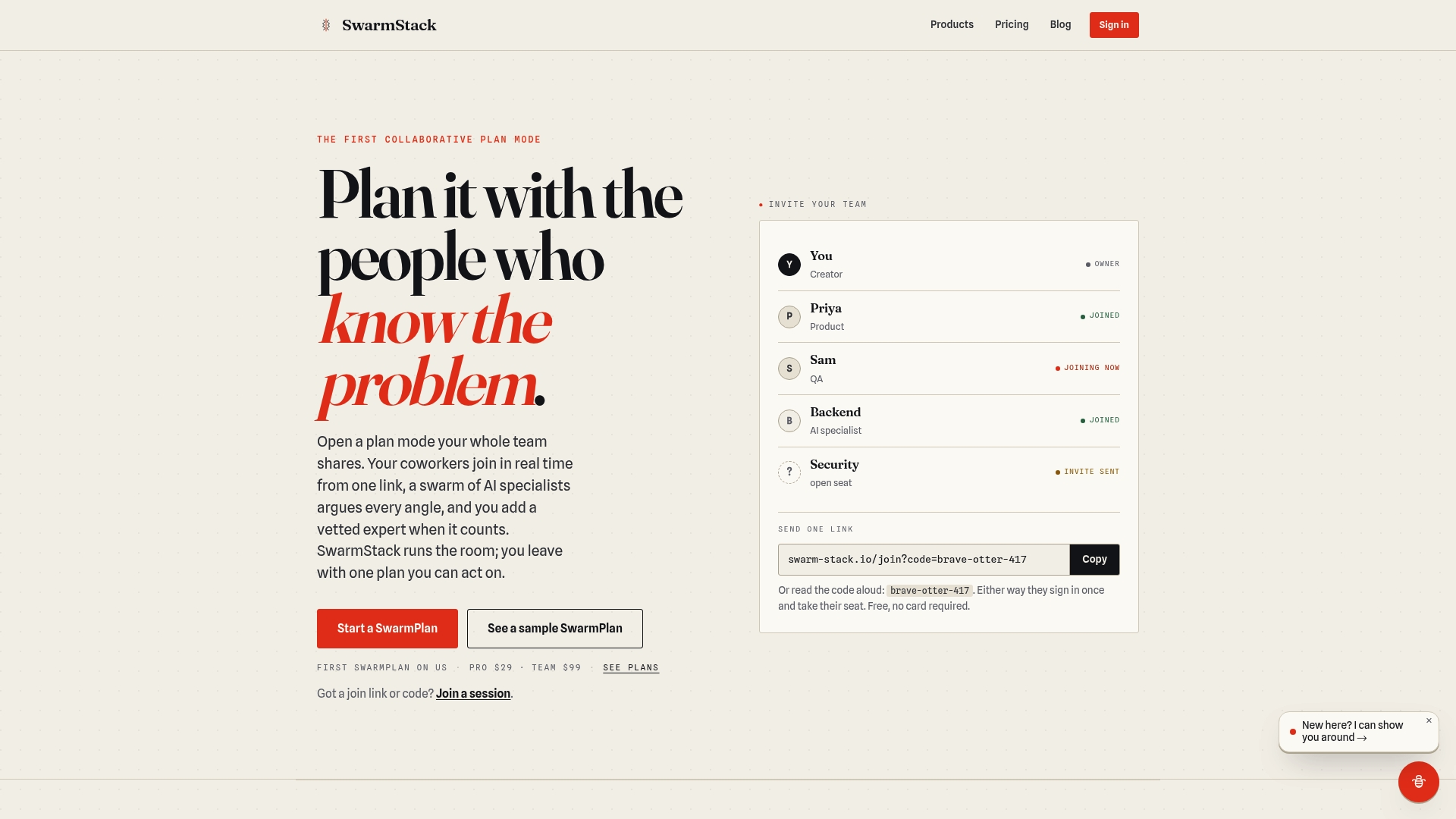
Swarm-stack runs structured collaborative sessions that combine human experts and AI specialists in real time. For product teams deciding between a story and a use case, a Swarm-stack session surfaces alternate flows, flags regulatory considerations, and produces a versioned decision artifact in one sitting, ready to export directly to Jira or Confluence.
- Real-time collaboration with versioned outputs. Every session produces a structured deliverable with decision tracking, so your rationale is documented alongside the artifact itself.
- Direct export to Jira and Confluence. Session outputs map to your existing workflow without manual reformatting.
Check Swarm-stack's pricing to see which plan fits your team's planning cadence.
Sources
The sources below are worth bookmarking if you want to go deeper on any of the topics covered here:
- User stories vs use cases: When to use which?
- Use Cases And Stories
- Scrum
- Synergistically Employing User Stories and Use Cases in the Practice and Teaching of Systems Analysis and Design